Learning how to start a digital product business is one of the smartest moves you can make right now. No inventory. No shipping costs. No physical storage. You create something once and sell it over and over again. That’s the model. And it works — for designers, writers, educators, coaches, and total beginners.
This guide walks you through every step. By the end, you’ll know exactly what to do next.
What Is a Digital Product Business?
A digital product business sells downloadable or online-access products. These include eBooks, templates, courses, presets, music files, printables, and software tools.
When someone buys from you, they get instant access. No packaging. No delivery delays. Your margin is nearly 100% after the initial creation cost.
That’s the core appeal — and why this business model keeps growing.
Digital Product Types: Quick Reference Table
| Product Type | Example | Best Platform | Price Range |
| eBook | “Meal Prep for Beginners” | Gumroad, Amazon KDP | $7–$49 |
| Template | Notion productivity dashboard | Etsy, Gumroad | $5–$35 |
| Online Course | Canva design for freelancers | Teachable, Podia | $49–$499 |
| Presets / Filters | Lightroom travel presets | Creative Market | $10–$50 |
| Printables | Wedding planning checklist | Etsy | $2–$15 |
| Swipe Files | Email marketing copy pack | Gumroad | $19–$97 |
| Stock Assets | Icon sets, illustrations | Creative Market | $15–$89 |
| Spreadsheet Tools | Budget tracker (Google Sheets) | Gumroad, Etsy | $9–$39 |
Step 1: Pick a Niche That Solves a Real Problem
Don’t pick a niche based on what sounds exciting. Pick one based on what people are already searching for and paying for.
Go to Etsy. Search “template” or “planner.” Sort by bestsellers. Look at what has thousands of reviews. That’s your market research — free, real, and current.
Good niche criteria:
- People actively search for this problem
- You have some knowledge or experience in the area
- Competitors exist (this confirms demand)
- The product can be created digitally
Avoid niches that are too broad (“business help”) or too specific (“left-handed accountants in Ohio”).
Read Also: AI Business Name Ideas
Step 2: Validate Before You Build
Most beginners skip this. They spend weeks building a product nobody wants.
Before you create anything, validate the idea. Here’s how:
Option A — Pre-sell it. Post about your upcoming product on social media. Ask if anyone wants early access. If nobody responds, rethink the idea.
Option B — Research search volume. Use Google’s free Keyword Planner. If people are searching “how to start a digital product business” or “Notion template for project managers,” there’s demand.
Option C — Study existing products. If similar products have 500+ reviews on Etsy or Gumroad, your market exists. Now make something better.
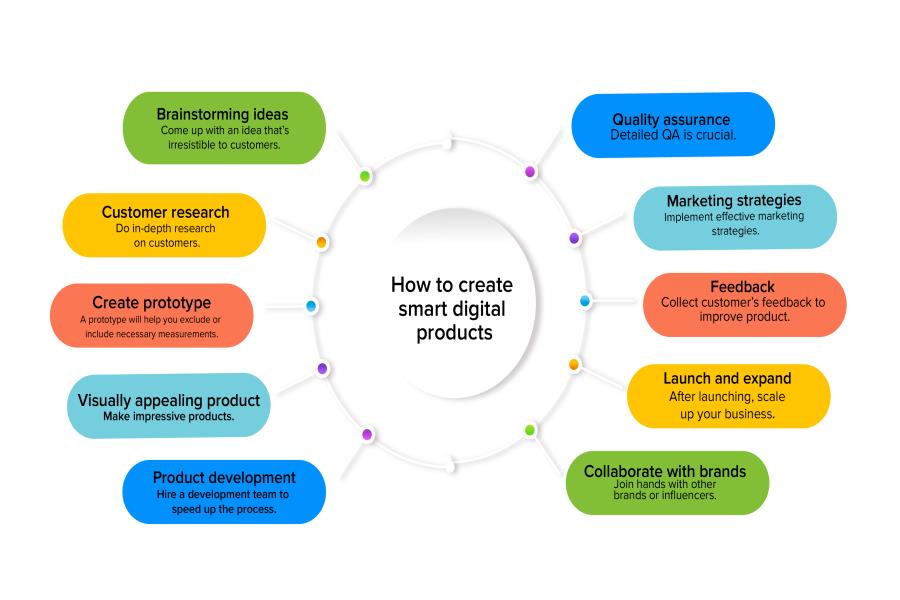
Step 3: Create Your First Digital Product
Keep it simple. Your first product does not have to be a 10-hour course. Start with something you can finish in a week.
Fast product ideas for beginners:
- A checklist (1–2 pages)
- A PDF guide (5–15 pages)
- A Canva template
- A Google Sheets tracker
- A resource list
Use tools you probably already have — Canva (free), Google Docs, Notion, or Microsoft Word. You don’t need expensive software to start a digital product business.
Focus on clarity over design. A clean, useful product beats a complicated one every time.
Step 4: Choose Where to Sell
You have two main options: your own store or a marketplace.
Marketplaces (Etsy, Creative Market, Gumroad)
- Built-in traffic
- Faster to set up
- They take a cut (typically 6–13%)
- You don’t fully own the customer relationship
Your Own Store (Shopify, Payhip, Podia, Lemon Squeezy)
- Full control over pricing and branding
- You keep more profit
- You’re responsible for driving traffic
- Better long-term business asset
Most people starting a digital product business from scratch should begin on a marketplace. Get your first sales there. Build reviews. Then layer in your own store over time.
Step 5: Price It Properly
There is one stumbling block at which most beginners get stuck and that is pricing. Because of their fear they under-price.
Let’s use a simple structure:
Standard product (booklet): $30–$49
The mid-range products include eBook, template pack, and guide products, which range in price from $19 to $79.
Learning product (course, coaching tool, part of a system): $49–$99
Don’t price based on the time it took you to make it. Value based on results it provides. A $300/month budget tracker is worth more than $9.
Step 6: Write a Product Description That Sells
Your product page is your salesperson. Treat it seriously.
A good product description will provide answers to these questions:
- Who is this for?
- What is its problem?
- What does it mean to them?
- Why would they want to purchase at this time?
Keep it benefits first, features second. Replace the title “This is a 12-page PDF” with “Stop Guessing What You Should Eat — This is a Meal Plan For the Week.
Use bullet points. Keep paragraphs short. Have an obvious “call to action.”
Step 7: Drive Traffic to Your Product
This is one of the aspects most guides overlook. When you create the product, you’ve only completed half the job.
These are the best sources of traffic for a digital product company:
Pinterest — Evergreen traffic. Ideal for templates, printables and guides. Pins are durable, and so last for many months or even years.
SEO (search engine optimization) — Develop blog posts or product listings based on your buyers’ keywords. Invests time with accumulative results.
TikTok / Instagram Reels – Demonstrate how the product works. Demonstrate how it has changed from its original state to its final state. This is a good opportunity for behind-the-scenes material.
Email list — Create from the get-go. Even 200 of the people you have on your email list who think you’re better than 10,000 of the people who follow you on social media.
YouTube — Tutorials that are natural leads to your product. Content calendar → sell content calendar template.
Not all of them are compulsory. Pick two. Get consistent. Add more later.
Step 8: Automate and Scale
Once you have one product selling, automate the delivery. Platforms like Gumroad, Payhip, and Podia handle this automatically. The buyer pays. They get access instantly. You don’t touch it.
Now you can focus on:
- Creating a second product
- Building a product bundle (higher average order value)
- Setting up an affiliate program
- Growing your email list
This is how a digital product business becomes a real income source — not by grinding harder, but by building systems.
How to Start a Digital Product Business
To start a digital product business:
- Pick a niche that solves a specific problem
- Validate demand before creating anything
- Create a simple first product (template, eBook, checklist)
- List it on Etsy, Gumroad, or your own store
- Write a product page focused on outcomes
- Drive traffic through Pinterest, SEO, or short-form video
- Automate delivery and scale with more products
Bottom line
Starting a digital product business is one of the most accessible online businesses available today. Low startup cost. High margins. Real scalability. The hardest part is choosing your first product and actually publishing it. Everything else you figure out as you go.
Read Also: Side Hustles for Teens: 21 Smart Ways to Earn Money While Building Skills
FAQs:
Q: How much money do you need to start a digital product business?
You can start for free. Canva (free plan), Gumroad (free plan), and a Gmail account are enough to launch your first product. Most people spend $0–$30 getting started.
Q: How long does it take to make money selling digital products?
Most people see their first sale within 2–8 weeks if they choose the right product and list on a marketplace with existing traffic. Building consistent income typically takes 3–6 months.
Q: What digital products sell the most?
Templates (Notion, Canva, Google Sheets), printables, eBooks, online courses, and Lightroom presets are consistently among the best-selling digital products on platforms like Etsy and Gumroad.
Q: Do I need a website to sell digital products?
No. Platforms like Etsy, Gumroad, and Payhip let you sell without a website. A personal website helps long-term but isn’t required to start.
Q: Is selling digital products passive income?
Mostly yes. After you create and list the product, sales can happen while you sleep. But you still need to drive traffic and update products over time. It’s semi-passive, not fully hands-off.
Q: What is the best platform to sell digital products?
For beginners: Etsy (built-in traffic) or Gumroad (simple setup, low fees). For more control: Payhip or Lemon Squeezy. For courses specifically: Teachable or Podia.


1 Comments